

How to File IFTA: A Step-by-Step Quarterly Guide for Truckers (2026)
Learn how to file IFTA quarterly tax returns correctly. Get the complete preparation checklist, filing deadlines, reporting methods, and audit-prevention tips.
Whether you are a new owner-operator or managing an interstate trucking fleet, learning how to file ifta accurately each quarter is vital for regulatory compliance. The International Fuel Tax Agreement simplifies commercial fuel tax reporting across 48 U.S. states and 10 Canadian provinces, but the filing workflow requires careful documentation, sound mileage tracking, and strict adherence to deadlines.
Missing a filing cutoff or submitting erroneous fuel calculations can quickly trigger state audits, financial penalties, and license suspensions. This guide provides a complete roadmap on how to file ifta, detailing the preparation checklist, calculation steps, filing methods, and compliance safeguards you need.
Quick Summary: Things You Should Know Before Filing
If you need immediate clarity on how to file ifta, keep these core rules in mind:
- Strict quarterly schedule: Returns are due four times a year on April 30, July 31, October 31, and January 31.
- Single-base jurisdiction reporting: You file a single consolidated return with your home state or province, which redistributes taxes across member jurisdictions.
- Mandatory zero returns: If your qualified motor vehicles sat idle with zero miles driven, submitting a zero-mile return is still legally required.
- Early data consolidation: Organizing mileage and fuel receipts monthly prevents administrative bottlenecks when learning how to file ifta.
IFTA Quarterly Filing Schedule & Key Requirements at a Glance
The table below outlines quarterly driving periods, deadlines, and key requirements for understanding how to file ifta.
| Quarter | Driving Period (Tax Quarter) | Statutory Due Date | Grace Period Rule | Primary Filing Destination |
|---|---|---|---|---|
| Q1 | January 1 – March 31 | April 30 | If date falls on weekend/holiday, due next business day | Base Jurisdiction Department of Revenue / DMV |
| Q2 | April 1 – June 30 | July 31 | If date falls on weekend/holiday, due next business day | Base Jurisdiction Department of Revenue / DMV |
| Q3 | July 1 – September 30 | October 31 | If date falls on weekend/holiday, due next business day | Base Jurisdiction Department of Revenue / DMV |
| Q4 | October 1 – December 31 | January 31 | If date falls on weekend/holiday, due next business day | Base Jurisdiction Department of Revenue / DMV |
Note: In accordance with official IFTA, Inc. guidelines, all returns and tax remittances must be postmarked or submitted electronically before midnight on the statutory due date.

Preparation Checklist: What You Need Before You Begin
Knowing how to file ifta begins with gathering accurate operational records. Assemble the following four documentation items before starting your return:
1. Total Fleet Mileage by Jurisdiction
Compile odometer logs or telematics reports showing:
- Total fleet miles: Every mile driven by qualified motor vehicles, including loaded, empty, and personal conveyance travel.
- Jurisdiction miles: The exact mileage traveled in each individual state and Canadian province.
2. Tax-Paid Fuel Receipts & Invoices
To claim tax credits on fuel bought at retail stations, gather receipts showing:
- Date of purchase
- Vendor name and physical station address
- Number of gallons or liters purchased
- Fuel type (diesel, gasoline, CNG, LNG)
- Total price or price per gallon
- Vehicle unit number or equipment ID
3. Overall Fleet Fuel Economy (MPG)
A central metric in understanding how to file ifta is calculating your quarterly fleet average Miles Per Gallon (MPG):
\text{Fleet Average MPG} = \frac{\text{Total Fleet Miles Across All Jurisdictions}}{\text{Total Gallons of Fuel Consumed}}
(Note: For Canadian travel, metric units must be converted: 1 U.S. gallon equals 3.78541 liters, and 1 mile equals 1.60934 kilometers.)
4. Active Base Jurisdiction Credentials
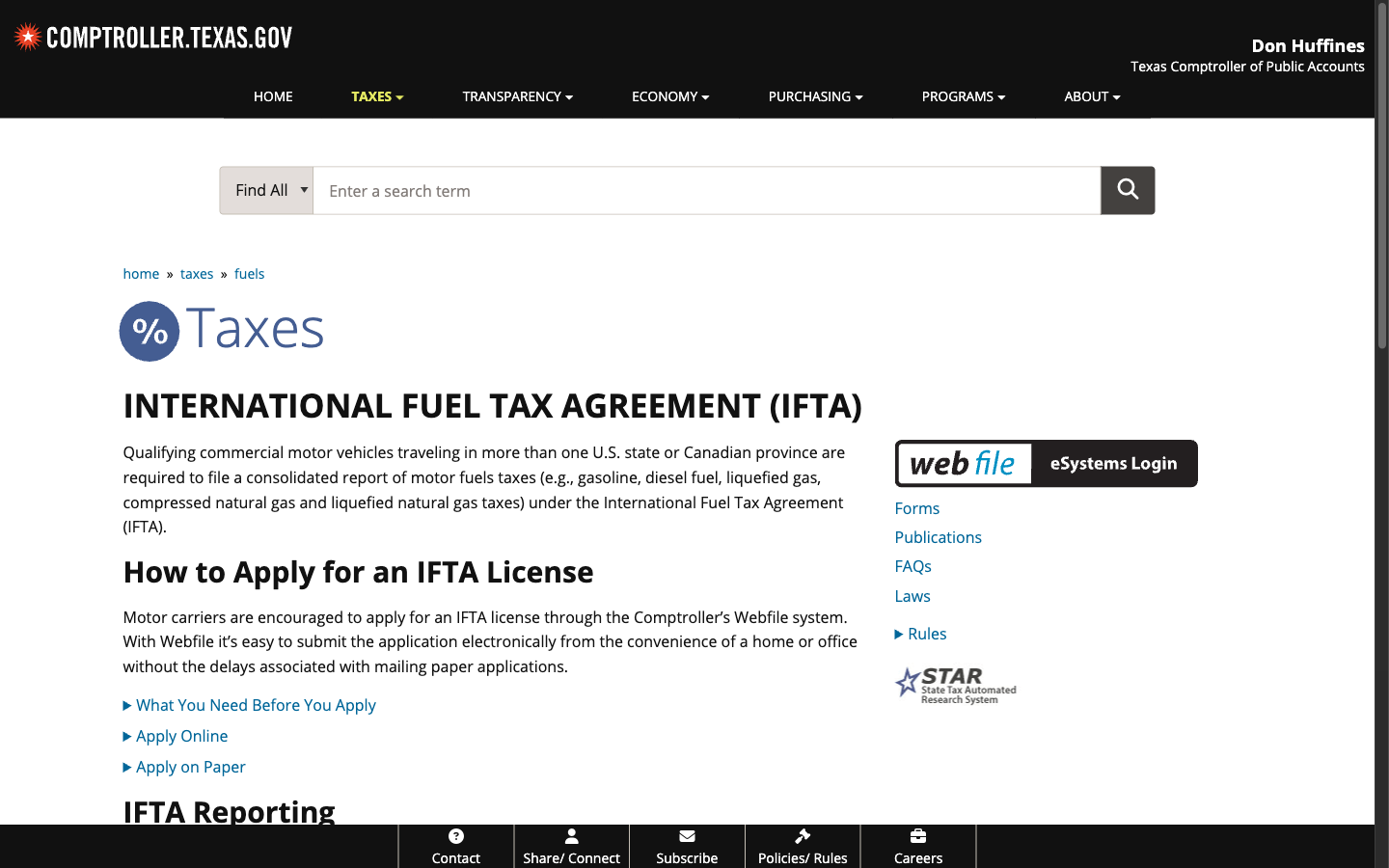
Ensure you have active login credentials with your home state portal, such as the Texas Comptroller Webfile system, North Carolina’s NCDOR eFile, or Washington State’s DOL License Express. First-time filers often require an activation PIN issued by mail, so verify your account access well before deadline day.
How to File IFTA: 5 Step-by-Step Instructions
Once your mileage and fuel records are verified, follow these five sequential steps detailing how to file ifta on time.
Step 1: Calculate Total Fleet Miles and Fleet MPG
To execute how to file ifta, start by adding all miles driven by qualified vehicles in all states. Next, add all gallons of fuel pumped into those vehicles. Divide total fleet miles by total gallons to calculate your fleet average MPG (rounded to two decimal places).
For example: Assume your fleet drove 24,000 total miles in Q1 and purchased 4,000 total gallons of diesel. Your fleet average MPG is 24,000 / 4,000 = 6.00 MPG.
Step 2: Determine Taxable Fuel Consumed per Jurisdiction
Under IFTA guidelines, fuel tax liability is determined by where fuel was burned rather than where it was purchased. Divide your jurisdiction miles by your fleet average MPG to find the taxable gallons consumed in each state.
For example: Assume you traveled 6,000 miles in Pennsylvania with a 6.00 MPG average. Your taxable fuel consumed in Pennsylvania equals 6,000 / 6.00 = 1,000 gallons.
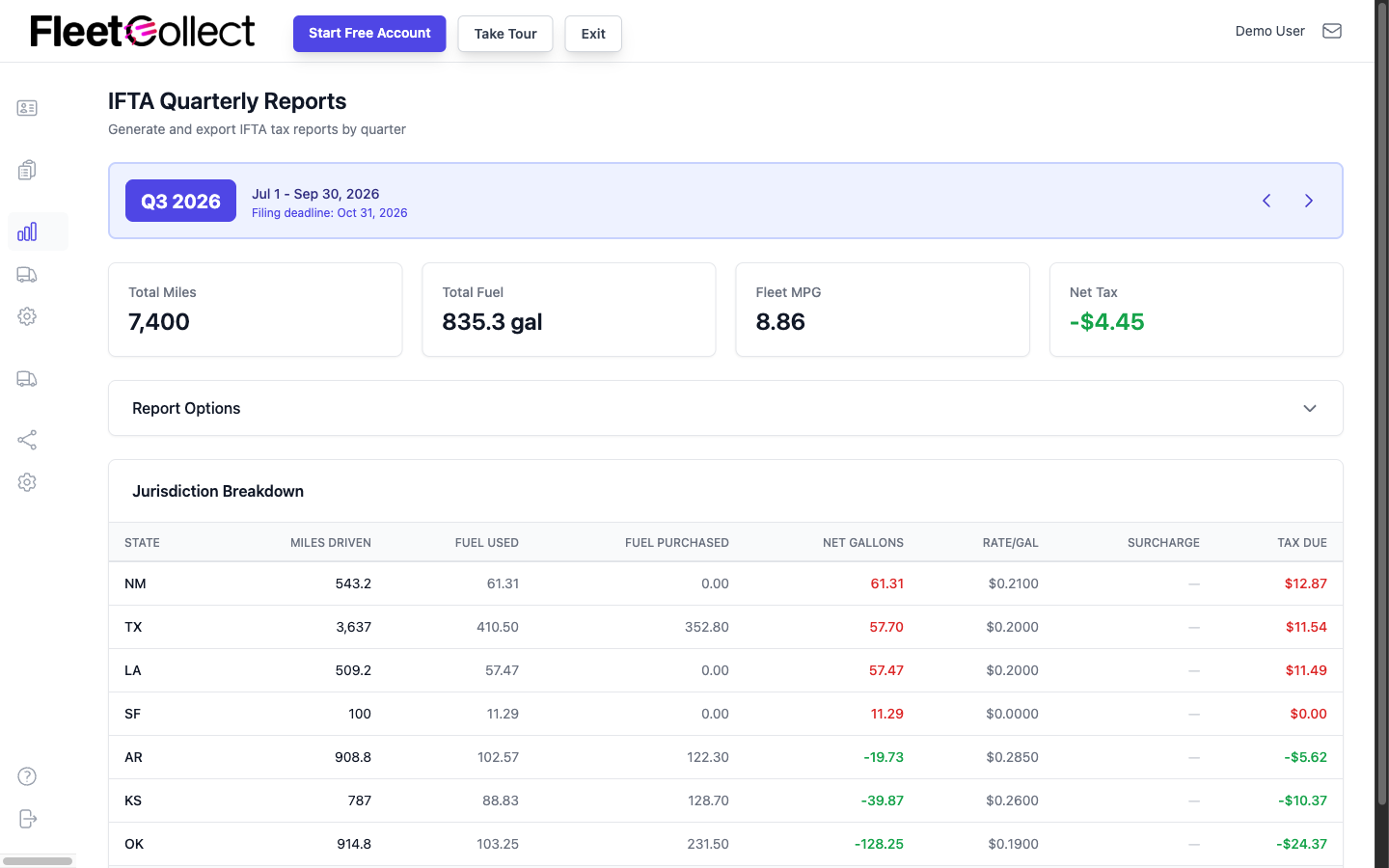
Step 3: Compute Net Taxable Fuel and Tax Due per State
When mastering how to file ifta, compare taxable fuel consumed against tax-paid fuel purchased in each state:
- Net Taxable Gallons = Taxable Gallons Consumed - Tax-Paid Gallons Purchased
- If you consumed more fuel in a state than you purchased there, you owe fuel tax to that jurisdiction.
- If you bought more tax-paid fuel in a state than you consumed there, you receive a tax credit.
Multiply net gallons by the current tax rates published in jurisdictional schedules like the Ohio Department of Taxation IFTA table.
Step 4: Submit Your Quarterly Return via the State Portal
Log into your base jurisdiction’s online portal to input your state-by-state miles and fuel purchases. Most state platforms automatically compute net tax balances, applicable interest, and currency exchange rates for Canadian provinces. Review your entries thoroughly to confirm they align with your dispatch logs.
Step 5: Remit Payment or Carry Forward Fuel Tax Credits
Conclude your process of how to file ifta by settling your balance. If you owe tax, pay via ACH transfer or credit card. If you have an overall credit, you may request an immediate refund or apply the credit toward next quarter’s return.
Following these structured steps ensures how to file ifta remains manageable every quarter.
Comparing Filing Options: Self-Filing vs. Software vs. Service Bureaus
Carriers have different methods when deciding how to file ifta. The comparison table below evaluates time demands, accuracy risks, and typical costs.
| Filing Method | Estimated Time Investment | Accuracy & Audit Risk | Typical Cost | Best Suited For |
|---|---|---|---|---|
| Manual Self-Filing (State Portal) | High (4–8 hours/quarter) | Moderate to High (Manual data entry and formula errors) | $0 (Free state portal) | Single-truck operators running predictable routes with few fuel stops |
| IFTA Software / Mileage Tracker | Low (15–30 minutes/quarter) | Very Low (Automated ELD sync, automated state line crossing) | 10–30 / truck / month | Independent truckers and growing fleets wanting fast, audit-ready reports |
| Third-Party Service Bureau | Very Low (10 minutes to send receipts) | Low (Handled by specialized motor carrier bookkeepers) | 75–250 / quarter / truck | Busy carriers without in-house office support seeking complete outsourcing |
Note: IFTADesk is our product; we have aimed to evaluate all tools and filing routes objectively.
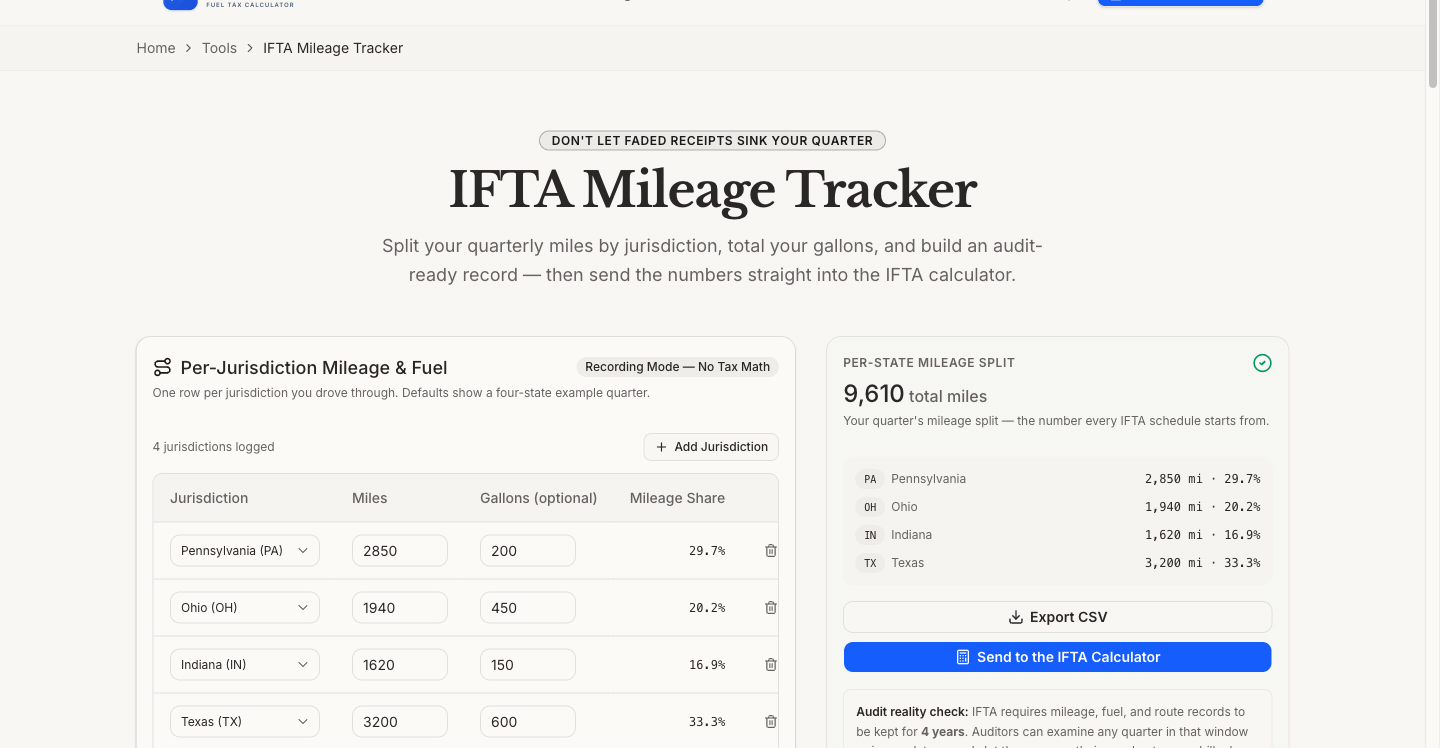
For motor carriers seeking a modern way regarding how to file ifta, utilizing the IFTADesk Mileage Tracker helps automate trip summaries and eliminates manual state boundary tracking. Pairing your quarterly tax workflow with tools such as the IFTADesk Per Diem Calculator further enhances driver bookkeeping and fleet management.
What Happens If You File IFTA Late?
Knowing how to file ifta on schedule is essential because late filing carries statutory penalties under IFTA Articles of Agreement R1220. If you submit a return past the statutory deadline:
- Late filing penalty: A standard penalty of $50 or 10% of the total tax liability is assessed, whichever amount is greater.
- Monthly interest charges: Statutory interest accrues on all delinquent balances from the day following the due date until full payment is made.
- Credential suspension: Repeated delays or unpaid balances lead to the suspension of your IFTA license, decal revocation, and vehicle seizure during roadside inspections.
For an exhaustive look at penalty abatement procedures and state interest schedules, review our detailed guide on IFTA late filing penalties and procedures.
Common Reasons IFTA Returns Are Rejected or Audited
Even when motor carriers understand how to file ifta, avoidable administrative oversights can lead to rejected submissions or audits:
- Failing to file mandatory zero returns: If your commercial trucks remained parked all quarter, you must still file a zero-operations return. Skipping it triggers automatic $50 fines.
- Metric conversion mistakes: Traveling through Canadian provinces requires converting liters and kilometers accurately. Miscalculations distort fleet MPG across all jurisdictions.
- Incomplete fuel receipts: Credit card summary statements lacking gallons or station addresses fail audit muster. Itemized receipts are legally mandatory.
- Mileage gaps across quarters: The beginning odometer reading of one quarter must match the ending odometer reading of the previous quarter.
- Premature document disposal: IFTA audit standards require preserving all trip logs and fuel receipts for at least 4 years from the filing date.
Understanding these pitfalls guarantees how to file ifta cleanly without regulatory friction.
Frequently Asked Questions About Filing IFTA
What is needed for IFTA reporting?
To complete your return when executing how to file ifta, you need total fleet miles, miles driven within each individual jurisdiction, itemized tax-paid fuel purchase receipts, calculated fleet average MPG, and active base jurisdiction login credentials.
What are common IFTA mistakes?
Common mistakes when learning how to file ifta include calculation errors in fleet MPG, missing or faded fuel receipts, failing to account for non-taxable miles, and neglecting to submit zero-mile returns for inactive trucks.
What happens if I don't file IFTA?
If you skip filing, your home jurisdiction assesses a $50 or 10% penalty, estimates your tax liability without fuel credits, charges statutory interest, and can suspend your IFTA license and vehicle decals.
Can I file my state IFTA taxes online?
Yes. Nearly all member jurisdictions provide secure web portals—such as Texas Webfile, Washington License Express, and Ohio OH|TAX eServices—enabling motor carriers to file quarterly returns electronically.
Visual Assets & Diagram Planning Table
The following planning table details recommended visual aids and technical diagrams designed to illustrate how to file ifta throughout this guide:
| Placement | Topic / Subject | Suggested Aspect Ratio | Recommended Alt Text | Source Type |
|---|---|---|---|---|
| Header Hero | Commercial truck dashboard showing GPS routing, fuel logs, and quarterly paperwork | 16:9 | Commercial trucker organizing quarterly fuel receipts and IFTA tax filing records | Curated photo / Editorial render |
| Section 1 | Diagram of required quarterly filing documentation (ELD records, fuel receipts, portal PIN) | 4:3 | Visual checklist of required documents for quarterly IFTA fuel tax filing | Vector infographic |
| Section 2 | Step-by-step flowchart of the 5-step IFTA calculation and filing workflow | 16:9 | Flowchart outlining the 5 steps to calculate fleet MPG and file IFTA tax returns | Process diagram / Infographic |
| Section 3 | Comparison matrix illustrating Self-Filing vs. Software Automation vs. Service Bureau | 3:2 | Comparison chart showing time investment and costs for IFTA filing options | UI table / Infographic |
| Section 5 | Infographic highlighting top 5 IFTA audit triggers and document retention rules | 4:3 | Diagram highlighting common IFTA filing mistakes and 4-year document retention rules | Compliance checklist graphic |